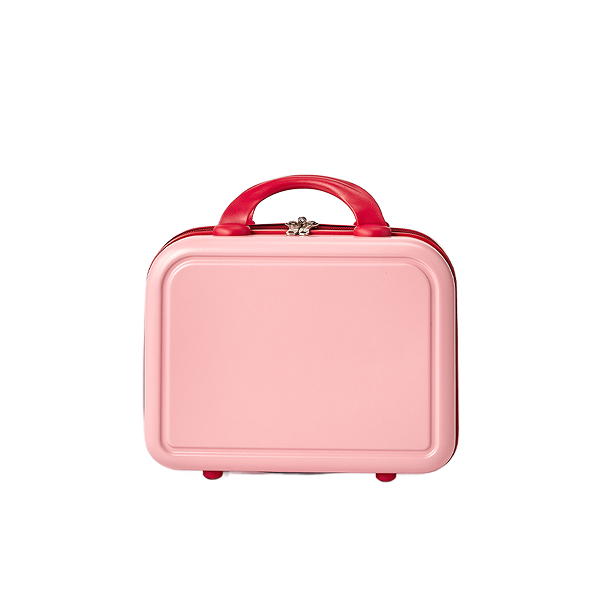
Dear, photoroom support team,
I am using AI replace background API using https://image-api.photoroom.com/v2/edit .
Suddenly, the removeBackground parameter of API stopped working. It used to work fine when I provided a transparent background image and set it to “false”, but now it is generating unexpected image.
It only works when set to “true,” but in this case, it unintentionally removes our foreground object.
Can you please check if there is any changes of the API?
I am currently using “background-studio-beta-2025-03-17” model with POST request.
It seems like just returning the original image as it is.
[input]
and my parameters:
referenceBox: “originalImage”
removeBackground: “false“
background.prompt: “A smooth solid plain infinite background in single strawberry milk pink color, evenly lit, seamless, with no gradients, patterns, lines, or textures. The object is standing upright on the flat surface, not lying down. The background should appear continuous with no distinction between wall and floor.”
And this is generated output image:
Hi there,
If your goal for the background is to include a color (strawberry milk pink color), I would suggest using the param (background.color=insert number). You can use our API playground to select the color, and the code will then be produced for you on the right hand panel. Let me know if you’re still getting issues removing your background after using this as guidance?
https://app.photoroom.com/playground-website
Best,
No, not only for the color, but also all other prompts are not working as well with removeBackground:”false”.
such as, “The object is placed on the kitchen countertop”
We used the API as our production product, and we know for sure it was working fine until mid-September.
You can try with this image, the image which already has the background removed.
https://medusa-production-s3.s3.us-east-1.amazonaws.com/6470132928b8cf669ac3386a/background-removed.png
With this image as input,
I ran https://image-api.photoroom.com/v2/edit with “background-studio-beta-2025-03-17” model,
“referenceBox”: “originalImage”
”removeBackground”: “false”
”background.prompt”: “The object is placed on the kitchen countertop”
And the output is below:
Hi @Hanhokim ,
If you’re looking to add an AI Background, could you try removing the parameter for ”removeBackground”: “false” completely.
For example:
–url ``https://image-api.photoroom.com/v2/edit``
–header ‘x-api-key: YOUR_API_KEY’
–form ‘imageFile=@“/path/to/image.jpeg”’
–form ‘referenceBox=“originalImage”’
–form ‘background.prompt=“The object is placed on the kitchen countertop”’
–form ‘background.expandPrompt.mode=“ai.never”’
–output result-with-expanded-prompt.png
I don’t quite understand. If it should always be “true(=default)”, then why does the removeBackground field even exist?
I have also confirmed that this “keep existing transparency” is not working either: Keep existing transparency | Photoroom API Documentation
Everything was definitely working until just a few days ago, but it seems that maybe after some internal update, the part that controls the transparency of the input image has stopped working. Could you please forward this to the engineering team for review?
I am 100% sure there is a bug in your recent changes.