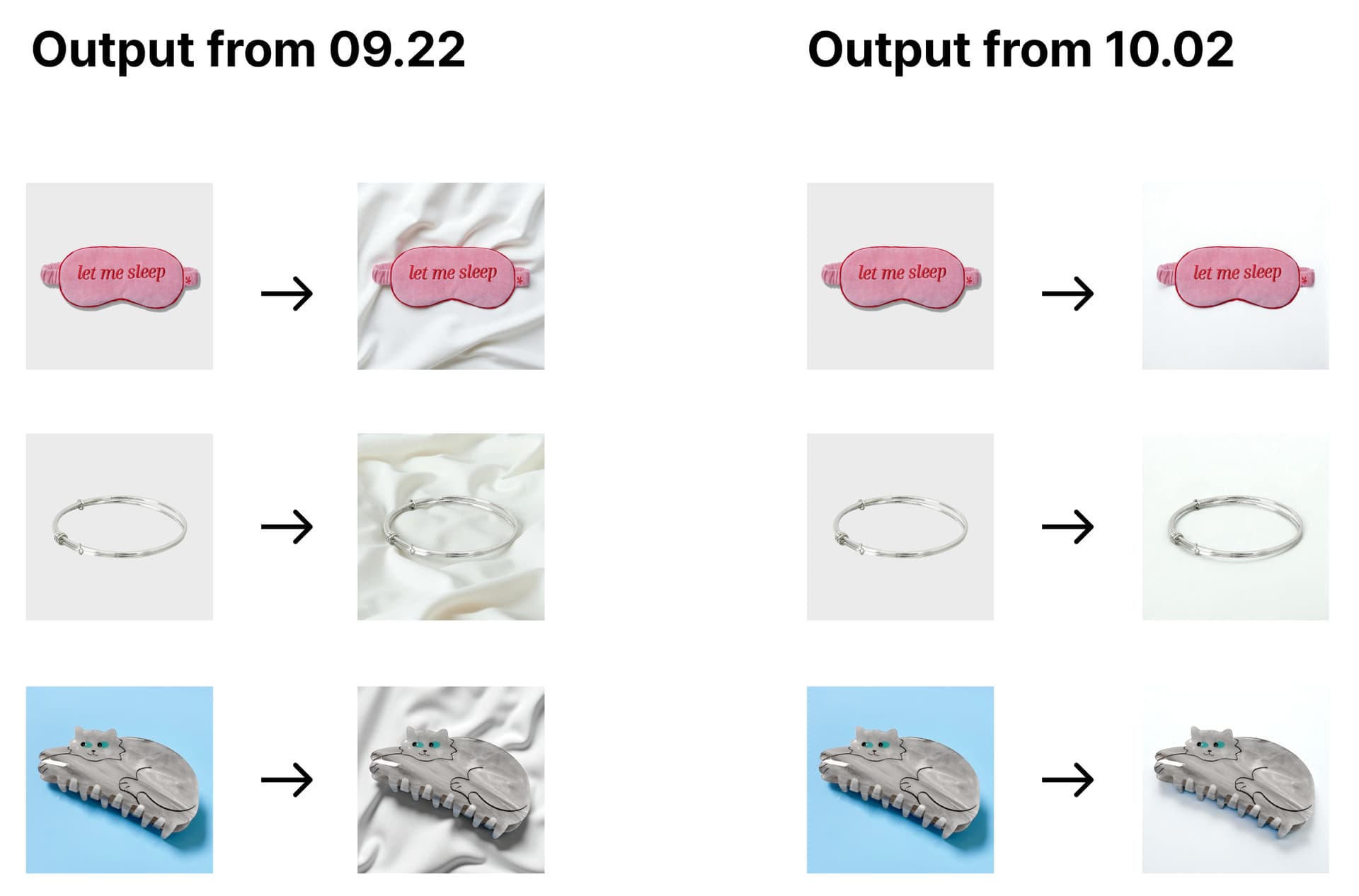
It seems like there have been some recent changes to your model, and the output quality has noticeably dropped. Please take a look at the comparison below.
The results were generated using the same prompt and the same seed.
Since we have collected and stored the previous test results internally, we can provide more comparison cases if needed.
Creased bed sheet in bright ivory white color, with gentle and natural slight folds that create a subtle sense of texture and depth, without being distracting. A minimal flat lay product photo. The product is lying flat on the fabric surface, clearly in a lay-down style, not standing upright.
I’m already well aware of the image guidance you have. What we want to understand is why prompts and seeds that used to produce good results are no longer working well. The issue isn’t just with “bed sheets”.
My service need to consistently produce product shots of the same quality, so we’ve been keeping records of the prompts and seeds that generate good results and using them repeatedly. So I have over a hundred different cases having this same problem. If you contact me, I can provide all of them. Can prove the quality difference between before & after.
If the model was updated, then according to general SaaS services’ conventions, the pr-ai-background-model-version should have been incremented with a new version identifier. What I don’t understand is why the model background-studio-beta-2025-03-17 was kept the same while the underlying model was changed a lot.
There’s nothing mentioned in the changelog either.
Is there really no way to use the pre-September version of the model?
If further updates are going to be handled like this, similar issues will keep happening in the future. For a paid SaaS service, that is very very serious problem.
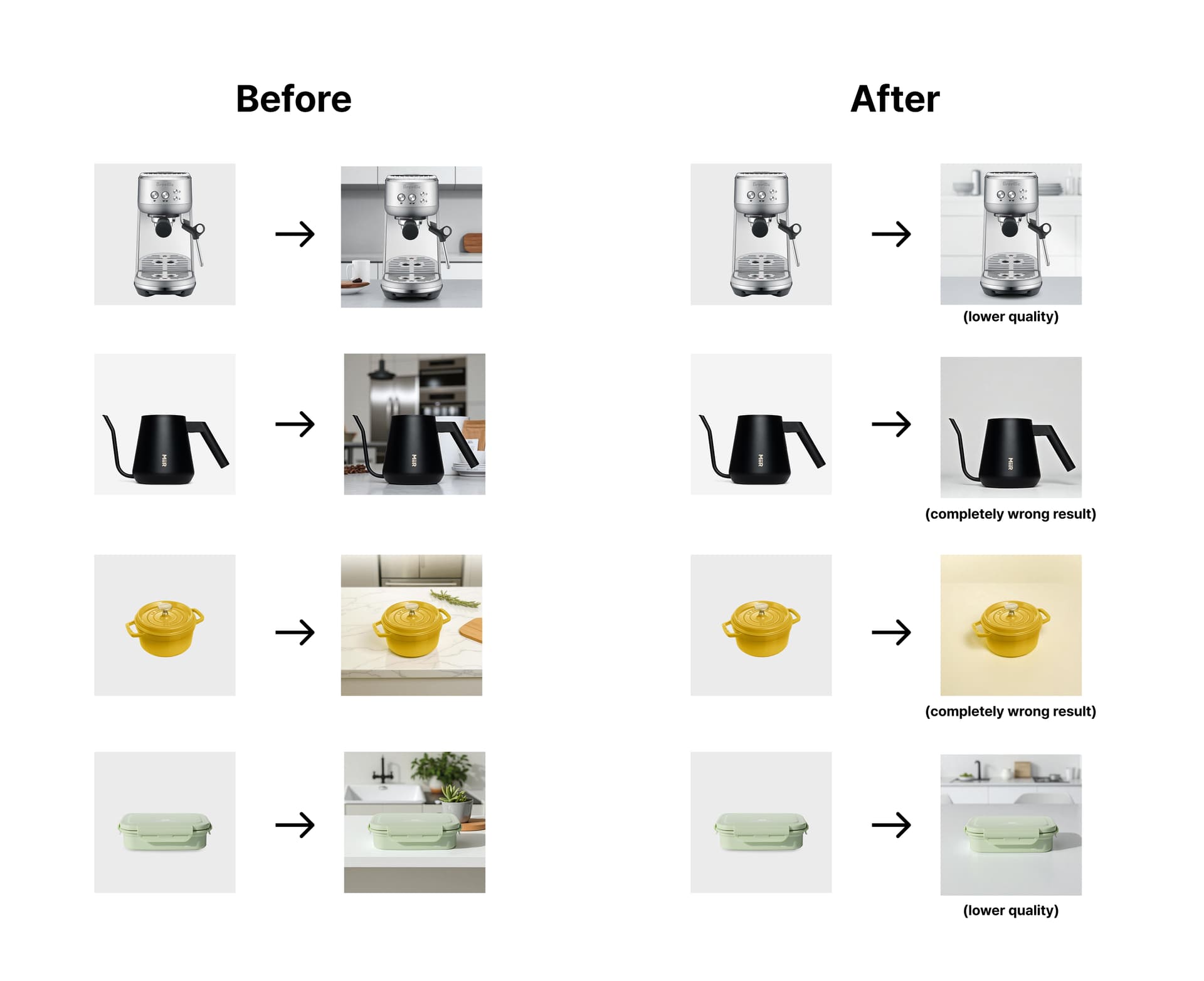
I attached other examples for comparing before and after. I used ai.never and background-studio-beta-2025-03-17 model. The overall quality has dropped (some results are even completely wrong), and things that used to be consistent have become inconsistent.
Diagonal rustic walnut wood texture with visible winding rich grain background. A minimal flat lay product photo. The product is lying flat on the surface, clearly in a lay-down style, not standing upright. Top-down camera angle, evenly lit, with clear focus on the product.
Do you acknowledge that there is currently an issue with the current version?
If so, are you planning to release an update for the issue? Then could you give us an approximate timeline of updates?
If you’re going to stick with this version, just let us know without further hesitation. We’ll either look for another AI model or try to rebuild our prompts.
Like you, we’re also a service provider, not a single individual user. So please give us a clear and transparent answer as a business partner, so we can plan our next steps accordingly.
I completely understand your frustrations with this. Please know we are working internally to find a solution on this and will follow up as soon as possible with next steps.
@Hanhokim I am so sorry for the delay but I have followed up internally for the status of resolution. I will provide another update as soon as possible tomorrow.
We released an improved version of the model that has correct prompt adherence.
We will make continuous improvements on this model:
The improvements should be minor changes and this was a bug, we apologize for it. We have settings in place to make sure the prompt adherence isn’t affected in future minor upgrades.
The best way to get consistent results on the long term is to use image guidance
Thank you so much for your patience and please let us know if you run into any more issues
I understand that all AI models are inherently “non-deterministic”, so even minor changes can sometimes lead to unexpected side effects. That’s why I believe it’s important to communicate and manage the updates transparently, even for small modifications.
I’d like to suggest a couple of potential improvements:
It would be great to have a changelog or release notification system so users can easily track what’s been updated.
It might also help to manage model versions more granularly. For example, similar to Google’s Gen AI models, which use detailed version labels like 2025-08-20 or 2025-10-12 and ensure backward compatibility.
Thank you again and let me test the latest version and share the result.
Overall, this update is great. However, expandPrompt ai.never still doesn’t seem to have improved much. On the other hand, the quality of expandPromptauto seems to have gotten even better than before.
Previously, we didn’t use expandPrompt as auto because the prompt generator seems to expand the prompt in an unpredictable way. But it seems to have become much more stable now, so we’re thinking of using auto instead of ai.never.
It feels like the pipeline difference between ai.never and auto has become much clearer.